Skip to content
Integration · Shopee Open Platform

Shopee integration

semut.live connects directly to your Shopee shop through the Shopee Open Platform — the official Shopee Live (Livestream) API. Your AI host goes live on Shopee Live with no stream key and no streaming software: we create the live, add your products to the bag, read comments for the host and keep your live performance.

Shopee Open Platform app: "Semut Live" (Livestream Management category) · Shopee app developer: Khairulzul Enterprise (202403028717). The Shopee connection is being opened to sellers in stages.

What semut.live does in your Shopee shop

Every step below is an official Shopee Open Platform API call, made only for the live sessions you book.

Create the live in your shop

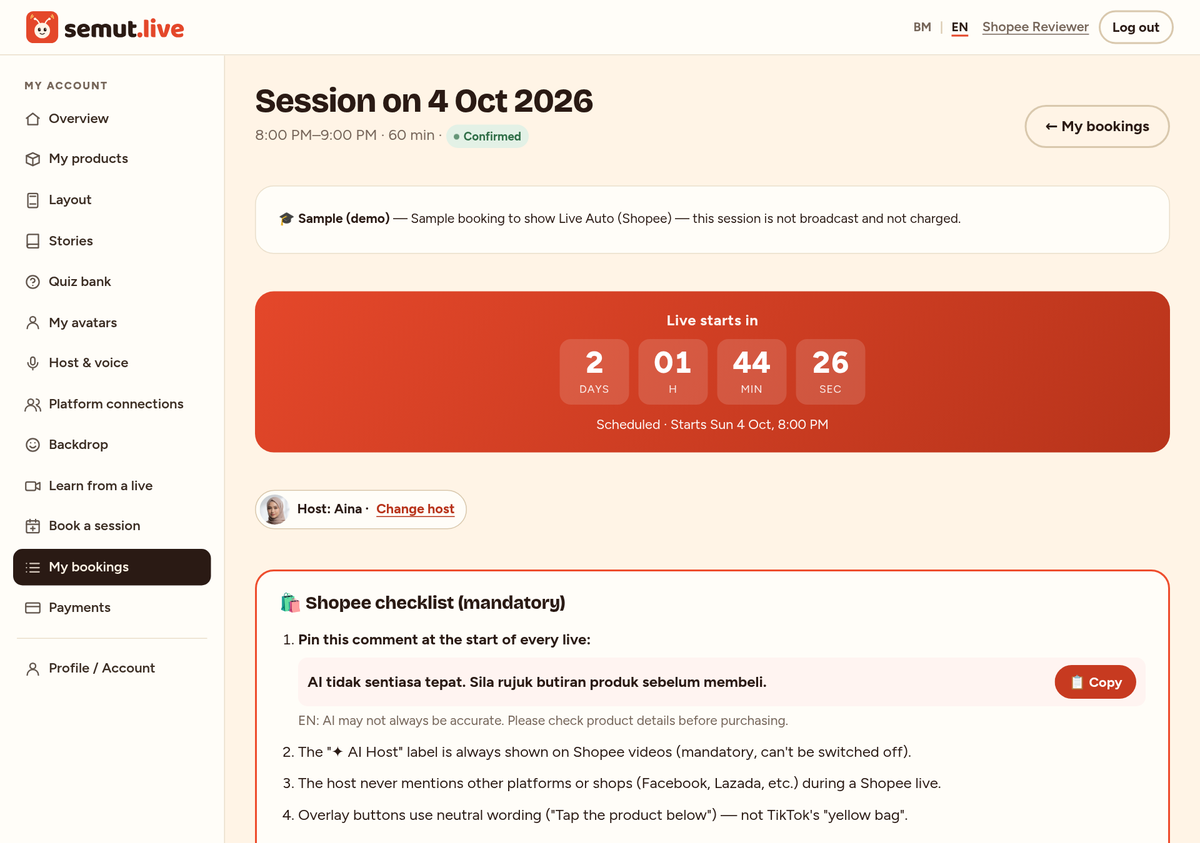
10 minutes before the session we upload the cover image and create a Shopee Live session in your shop, then fetch that session's push URL. No stream key to copy.

v2.livestream.upload_image · create_session · get_session_detail

Stream the AI host

Our servers push the AI host video to that session's push URL, start the live at the time you booked and end it when the session is over.

v2.livestream.start_session · end_session

Products in the live bag

Your products that are linked to items in your Shopee shop are added to the live shopping bag automatically.

v2.livestream.add_item_list

Read comments, the AI host answers

Viewer comments are read every few seconds and passed to the AI host, who answers out loud in the live (greets viewers by name, answers product questions).

v2.livestream.get_latest_comment_list

AI disclosure comment

As soon as the live starts we post the "AI may not always be accurate…" comment as your shop's comment. Shopee has no API to pin a comment yet, so we remind you to pin it in the Shopee app. The "AI host" label is always shown on Shopee videos.

v2.livestream.post_comment

Live statistics

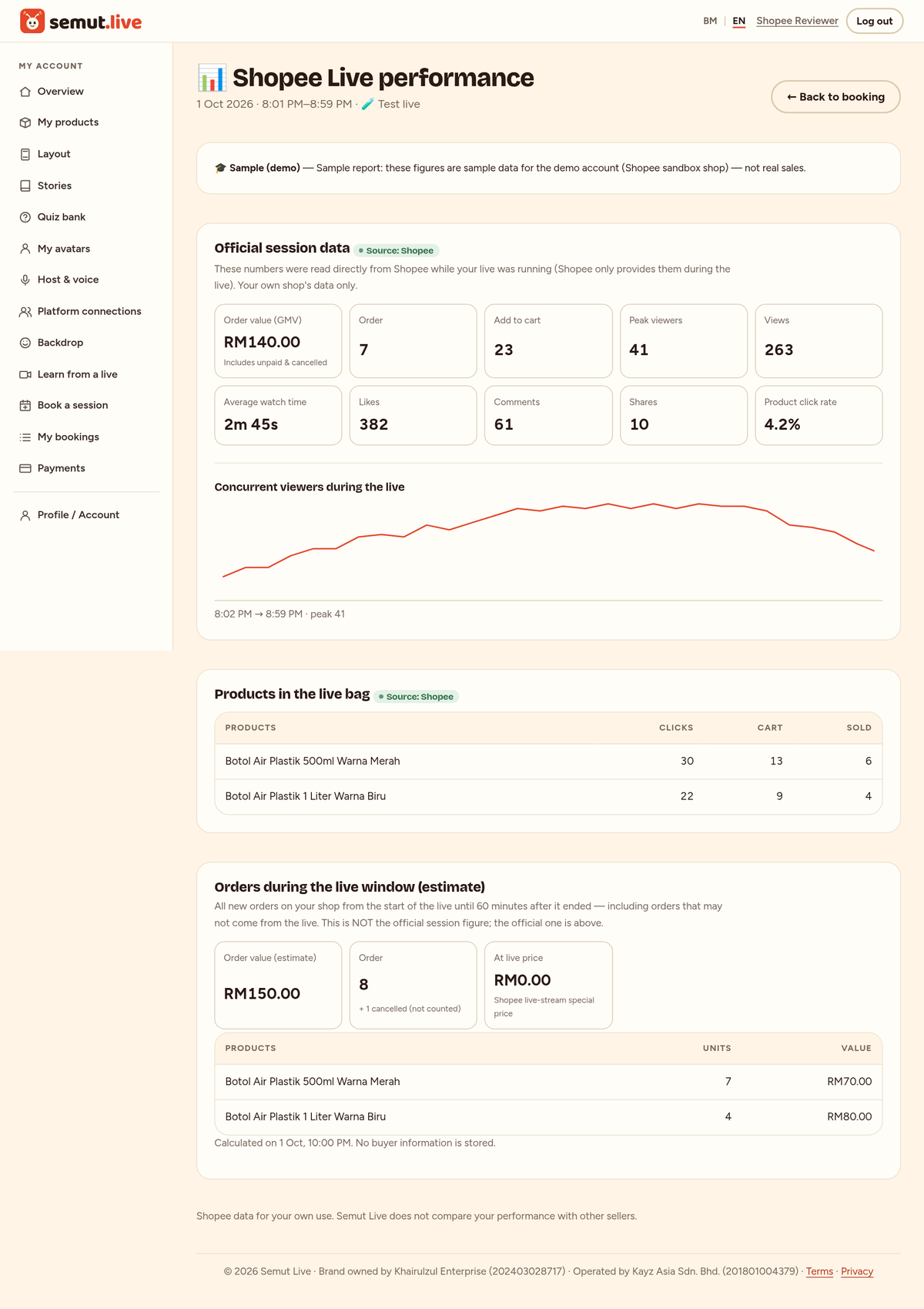
During the live we store the session statistics (viewers, likes, comments, product clicks, add-to-cart, orders) and per-product statistics — shown on the "Shopee Live performance" page, to you only.

v2.livestream.get_session_metric · get_session_item_metric

Order estimate during the live

About 60 minutes after the live we total your shop's new orders in the live window (count, value, products). Only aggregate figures are stored — no order numbers and no buyer information.

v2.order.get_order_list · get_order_detail

Connection & tokens

The official Shopee login (OAuth) for seller accounts, access tokens refreshed automatically, and the shop name and region to show to you.

v2.auth.token.get · access_token.get · v2.shop.get_shop_info

We never change your products, prices, stock or orders, never send chat messages to buyers, and never read buyers' names, addresses or phone numbers.
How to connect your Shopee shop

  1. Log in to semut.live → Dashboard → More → Platform connections → "Connect Shopee".
  2. You are taken to the official Shopee login page. Log in with your seller account and press "Confirm Authorization".
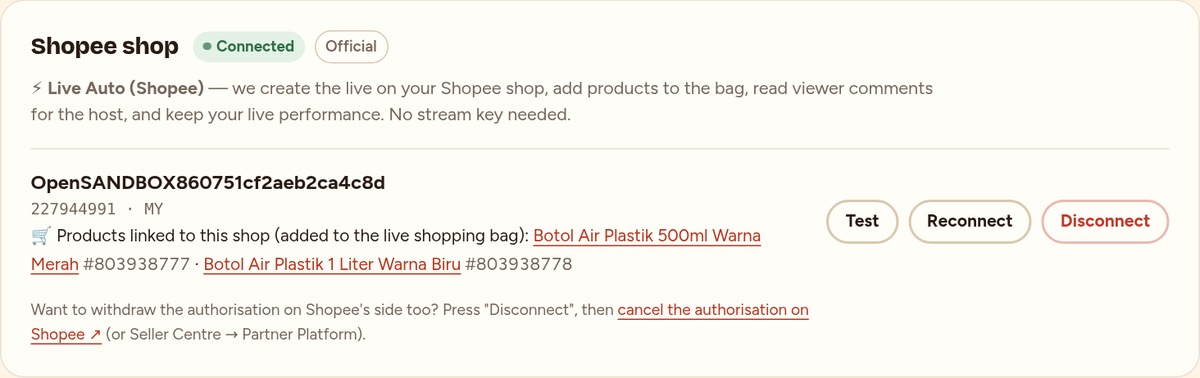
  3. Back on semut.live your shop shows as "Connected". Press "Test" any time to check the connection.
  4. On the Products page, paste the Shopee item link (or item ID) into "Same product on Shopee" — that product goes into the live bag.
  5. Book a session, choose the Shopee platform and "Live Auto" mode. At session time the AI host goes live in your shop; afterwards open "Shopee Live performance" and the "Live report".

Revoke access any time: press "Disconnect" under Platform connections (tokens are deleted immediately), and/or cancel the authorisation at Shopee (Seller Centre → Partner Platform).

What the integration looks like in semut.live

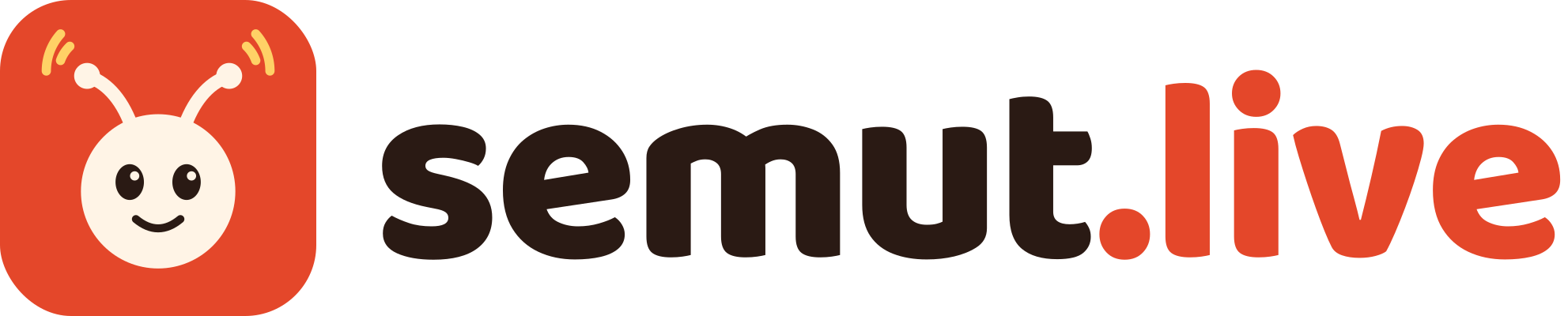
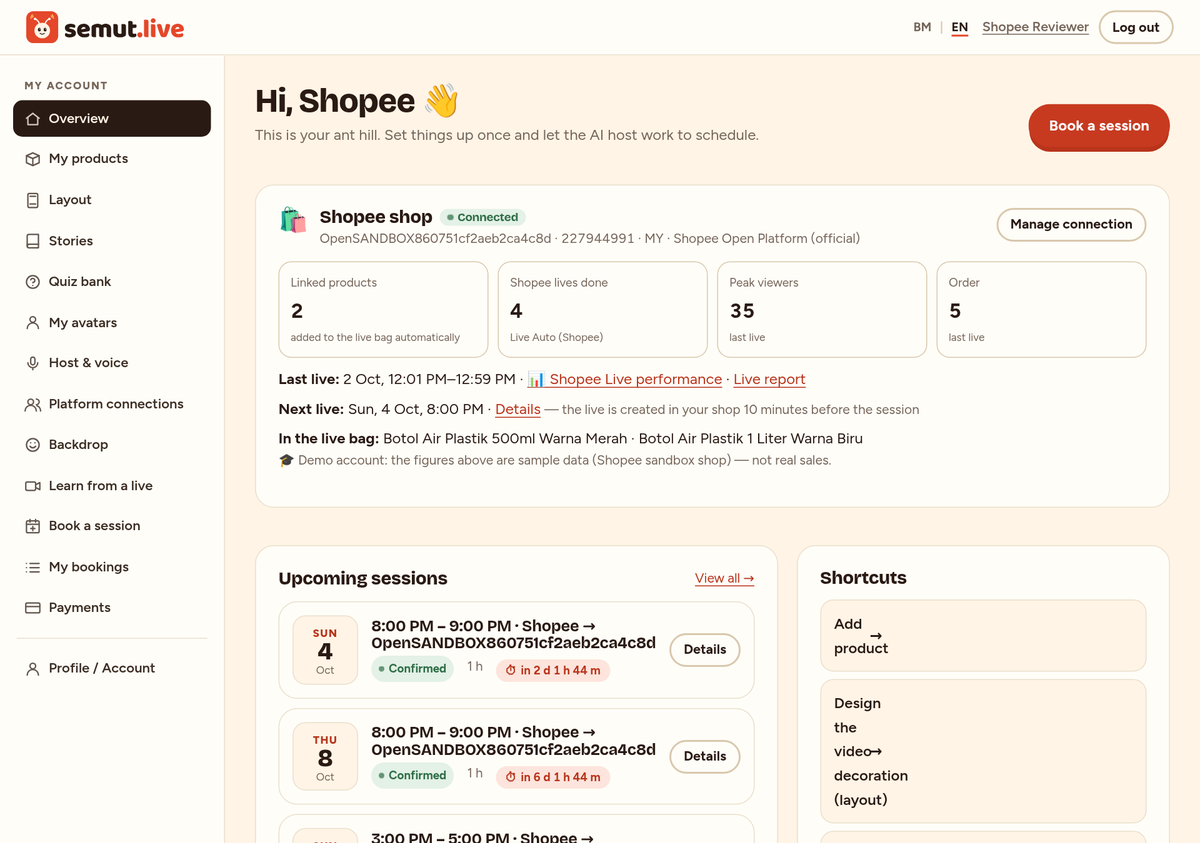
Screenshots from a demo account connected to a Shopee sandbox shop (products and figures are sample data).

Dashboard: the "Shopee shop" card — connection status, products in the live bag and the last live.
Platform connections: a Shopee shop connected through the Shopee Open Platform.
A Live Auto (Shopee) booking: the live is created in your shop 10 minutes before the session.
Shopee Live performance: the official session figures from Shopee (demo account, sample data).
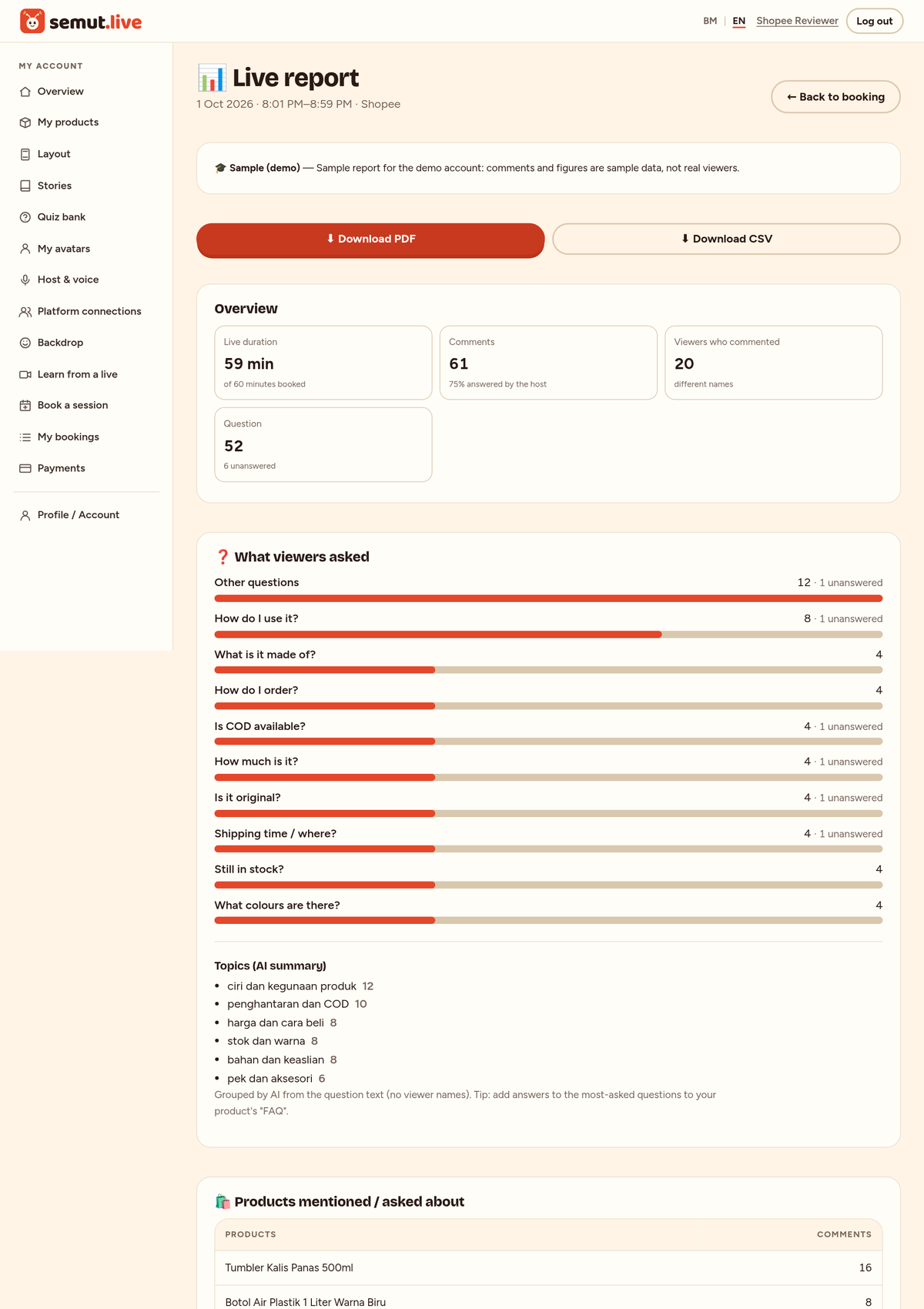
Post-live report: comments, questions and the busiest moments.
Products linked to Shopee items — added to the live bag automatically.

Data we access from Shopee

Permissions requested when you connect: Livestream (manage your shop's live sessions), Order (read only — for the order estimate during the live) and shop information (name & region).

DataPurposeSaved
Shop ID, Shopee user ID, shop name & regionIdentifies the shop you connected; shown under Platform connections.Until you disconnect
Access & refresh tokens (encrypted)To make API calls on behalf of your shop — only for the lives you book.Deleted immediately when you press "Disconnect"
Live session ID & push URL (encrypted)To send the AI host video to your live.With the booking
Live viewer comments (username & text)So the AI host can answer; the post-live report.14 days
Your shop's live statisticsThe "Shopee Live performance" page, for you only.With the booking
Aggregate order totals in the live windowThe order estimate during the live (count, value, products).With the booking

Privacy & control

  • Shopee tokens and push URLs are stored encrypted and never written to logs.
  • Your Shopee data is for you only: we never compare your performance with other sellers and never mix Shopee data with other platforms' data.
  • We do not request or store buyers' names, addresses, phone numbers or other personal information.
  • Every Shopee live shows the "AI host" label and the AI disclosure comment, following Shopee's rules for using AI in Shopee Live.

Full privacy notice → · Terms of service →

Other platforms

The same AI host can also go live on other platforms through their official APIs:

  • Facebook Live — Connect your Facebook Page (official Meta login). Live Auto creates the live video on your Page and reads comments so the AI host can answer. Or use a stream key from Live Producer.
  • YouTube Live — Connect your YouTube channel (official Google login). Live Auto creates the broadcast on your channel and reads the live chat so the AI host can answer. Or use a stream key from YouTube Studio.

Questions?

Email us at hello@semut.live. Log in →